safety toolsincluded free

Someone should always know where you are.

Three tools that take a minute before you launch, all currently included on the free plan.

01 · live beacon

A link anyone can watch.

Start a Beacon before you launch and send the link to whoever's on shore duty. They see your latest reported position and how long ago it updated, in any browser. No account, no app install. It needs your phone to have power and signal.
Works on any phone: the watcher just opens a web page.
Shows freshness: the page makes clear when the last position update was received.
Ends itself: the link expires when you finish, so nobody tracks you to the pub.
paddleroutes.io/b/K7XQ2
live · Meg's paddle
5.8
km
live
status
2 min ago
updated
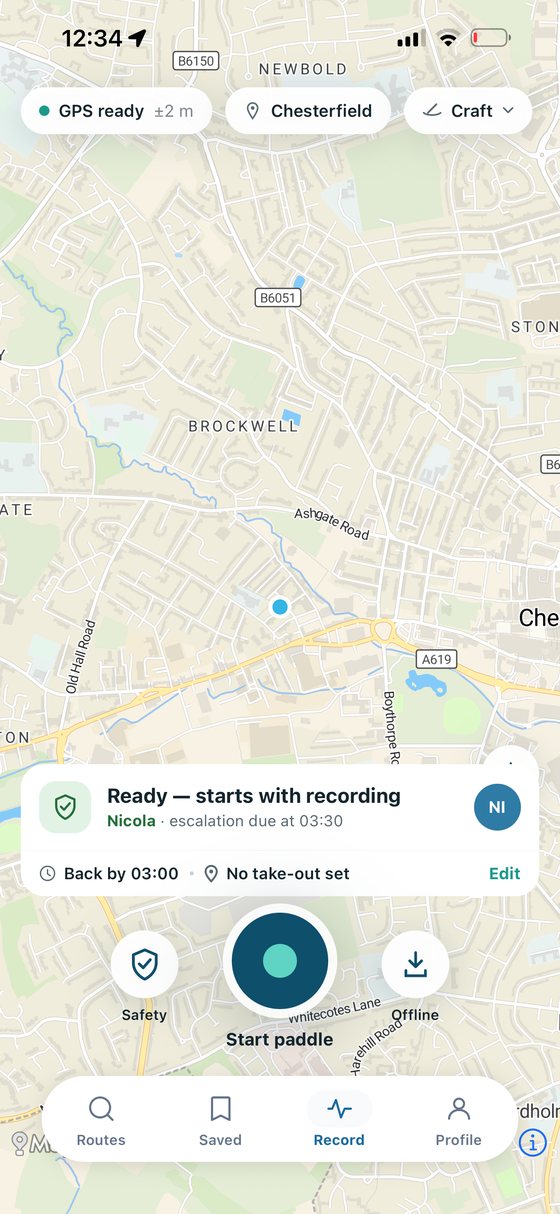
The record screen with a float plan armed: the chosen contact, the expected return time and when the alert would go out.
14:30 passed, no check-in14:31Your contact gets the full plan and the last position your phone managed to send, without you having to do anything once you're overdue.
02 · float plans

The note on the kitchen table, upgraded.

Coastguards have asked for this for decades: tell someone where you're going and when you'll be back. A float plan does it in four taps (route, party, timings, contact) and then does the one thing paper can't:

It notices when you don't come back: miss your expected return and your selected contacts can be notified with the plan and the last position your phone managed to send. It is not a monitored rescue service.
One-tap check-in: "off the water" from the get-out, or extend it if you stop for chips.
Server-side overdue checks: once the plan is filed, the service checks its deadline independently of the app; delivery still depends on the service and email provider.
03 · emergency screen

For the five minutes you hope never happen.

Cold hands, wet screen, adrenaline. During a paddle, the emergency screen keeps the call guidance and your latest captured GPS coordinates readable at arm's length.

The right emergency number: 999, 112 or whatever applies where you are, with the guidance to ask for the Coastguard on tidal water.
Copy or share your position: send the captured GPS coordinates using the tools available on your phone.
Signal tools: Float to Live guidance, a screen strobe and an SOS whistle pattern stay close at hand.
12:18▂▄▆
emergency
Call 999
ask for the Coastguard
what3wordstext contact
your position
50.0946° N, 5.1953° W
Captured just now · ready to copy or share
location captured · verify it before reading aloud

The sixty-second launch drill.

The app prompts this checklist when you start any paddle. It's not ours. It's what the RNLI and British Canoeing have been saying for years, wired into the moment you'd actually forget it.

1Wear the buoyancy aid. Worn, not stowed. It only works if it’s on.
2Check the conditions card. Wind direction first. Offshore? Think again.
3File the float plan. Four taps. Someone ashore knows the plan.
4Start the Beacon. Phone in a waterproof pouch, on your body, not the boat.
5Dress for the water. Not the weather. 16 °C air can sit on 10 °C water.
6Know your get-outs. Every route marks its escape points. Glance before you go.
Paddle Routes is planning software, not a rescue service. In an emergency call 999 and ask for the Coastguard. For skills training, find a British Canoeing or Paddle Scotland course near you.Our full safety approach →

Free, because it should be.

Beacon, float plans and the emergency screen ship with every account. No trial, no tier, no catch.

Or use it in theBrowser